Jira and Confluence from Claude Code
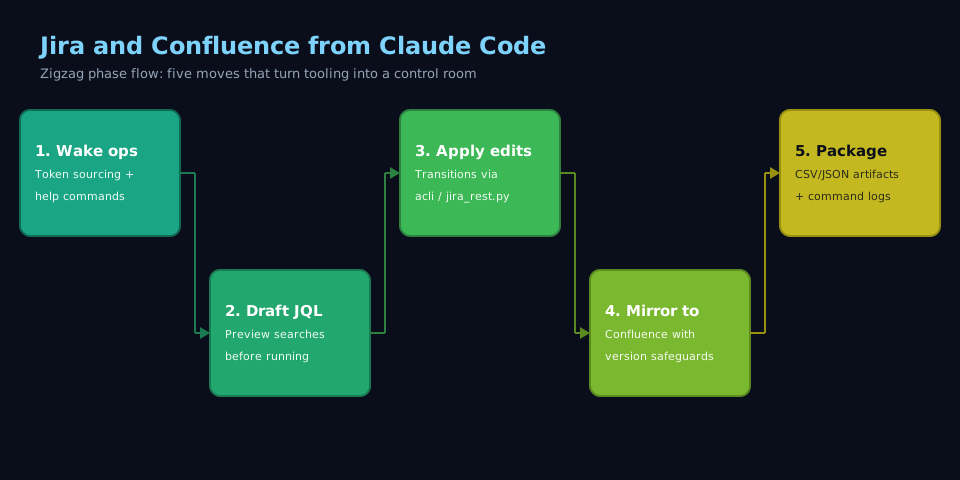
Mid-sprint, every release-blocker ticket still read “Selected for Development,” while the triage call lived only in Slack. Five issues plus the wiki page meant twenty minutes of tabs. In one Claude Code session I run ops:jira with JQL, transition those keys, then ops:confluence with GET-version-and-PUT on the decision page. Under a minute; the transcript holds the receipts.
When I reach for this #
When I owe triage updates faster than a browser page loads. When sprint reviews demand precise Jira state changes plus Confluence breadcrumbs.
What I need before starting #
- Atlassian credentials with API tokens stored in env vars (
ATLASSIAN_USERNAME,ATLASSIAN_API_TOKEN) — never inline - Access to your Atlassian site (e.g.
your-company.atlassian.net) with rights in the Jira project and linked Confluence space you care about - Claude Code configured with the
ops:jiraskill (acli + helper scripts) andops:confluenceskill (curl workflow) - Working acli install plus the bundled
jira_rest.pyscript for epics, sprints, and custom fields - Familiarity with the JQL and CQL snippets you run most often (assignee filters, status buckets, date windows)
What I do #
1. Wake the skills and set the guardrails #
Early in the session I run ops:jira --help and ops:confluence --help so Claude caches binary paths.
Jira: acli must already target the right tenant (https://your-company.atlassian.net).
Tokens: I load ATLASSIAN_* from 1Password CLI (or equivalent)—never paste into chat.
Confluence: ops:confluence is curl + JSON; the skill template carries Basic Auth wiring so each call is signed the same way.
2. Draft the JQL before touching data #
Explicit JQL first—always search before mutate:
ops:jira search --jql "project = PROJ AND labels = release-blocker AND status in ('Selected for Development','In Progress')" --limit 50
- Default output: human table for eyeballing.
- Add
--jsonor--csvonly when a script consumes it.
Before bulk transitions I rerun the same JQL with --preview so the log shows the exact keys I’m about to touch. Then I drop those keys into $ISSUES for the next command.
3. Apply edits with the right tool #
Day-to-day Jira (transition, comment, watcher, link) stays in acli:
ops:jira transition --issues "$ISSUES" --state "In Progress" --comment "Pulled during mid-sprint triage"
REST-only fields (story points, sprint placement, epic wiring) go through the bundled script:
ops:jira rest --script jira_rest.py --action set_story_points --issue PROJ-1234 --points 5
Same env vars as search—no new secret surfaces. I repeat site host + project key on every call so a typo doesn’t hit the wrong tenant.
4. Mirror decisions into Confluence #
ops:confluence exists because headless acli confluence + OAuth is brittle. Pattern: GET version → edit → PUT.
Fetch current page + version:
ops:confluence get --page-id 123456 --output decision.json
Note version.number. Bump it in the payload, then update:
ops:confluence update --page-id 123456 --body-file update.json --version 47
Keep the storage block clean so Claude can patch text without breaking macros.
Search: CQL when I need discovery, e.g. type = page AND space = TEAMDOCS AND text ~ "release-blocker". Add --json when I’ll diff bodies locally.
5. Package artifacts for reviews #
- Jira:
--csv > blockers.csvfor spreadsheets, or--jsonintojqinside the same session. - Confluence: turn on the skill’s
--logflag so every REST call is timestamped—when someone asks where a paragraph came from, I paste the exact command from the log.
What goes wrong #
- Forgetting to fetch the Confluence version first. The API rejects the update as a conflict, or worse, you unknowingly overwrite someone else’s edit. Fix: always run
ops:confluence getand bumpversion.numberin your payload beforeupdate. - Running destructive commands on untested JQL. One missing clause and you transition half the board. Fix: pipe every new query through
ops:jira search --limit 5or--previewbefore chaining edits. - Leaking secrets by pasting tokens inline. They land in Claude transcripts and shell history. Fix: set env vars outside Claude, or source them from 1Password/Bitwarden CLI, and ensure skills read from those names.
- Trying to use
aclifor Confluence. It silently fails because of OAuth quirks and you think your script succeeded. Fix: stick to the REST-basedops:confluenceworkflow until Atlassian fixes acli auth.
Notes #
Snippet library — keep a personal file of JQL and CQL templates: top priorities for your default project, “updated within the last 3 days,” “comments by me.” I drop it next to my skills in the playbook repo so I’m not retyping under pressure.
Cadence — once Jira and Confluence live inside Claude Code, sprint rhythm tracks how crisp the queries are. Sharp JQL/CQL beats fast clicking through the same filters every week.