Query your data warehouse with Athena
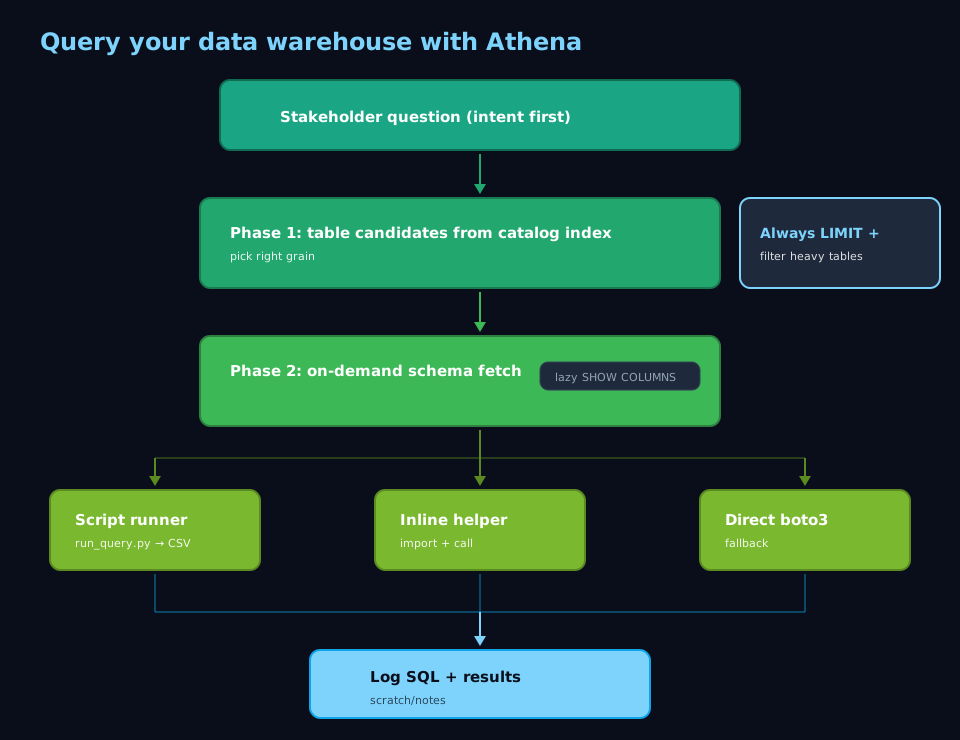
PM asks for weekly actives on a funnel segment last quarter. Old path: Slack the data team, wait, maybe get a table name by Tuesday. New path: state the question, run the warehouse skill in discovery mode against the catalog index, pick the fact table at the right grain, fetch schema for that database.table only, run SQL through run_query.py into scratch/results/. CSV and answer land before the Slack thread would have picked an owner.
When I reach for this #
A stakeholder wants data that lives in our org lake but I don’t remember the table names. I need to explore a new dataset without burning an afternoon downloading schemas. Or I’m pairing with another agent that needs structured data mid-session and I can’t break flow to hand-build queries.
What I need before starting #
- Claude Code with a warehouse skill installed (mine wraps AWS Athena + the catalog index; adapt the name to whatever you ship)
- AWS credentials that allow Athena + S3 output (the profile your team uses for analytics in your shell)
- The table index JSON (bundled with the skill) refreshed recently, so Phase 1 has the right names
- Access to the databases your warehouse actually exposes — in my setup that’s three logical catalogs (e.g.
analytics_warehouse,reporting_mart, andshared_lake; substitute your realdatabase.tablenames from the index) - A scratch pad for intermediate SQL results — I keep
scratch/results/in the repo - A clear question stated in a sentence; the skill routes better when intent is crisp
What I do #
The flow stays the same regardless of the question: Phase 1 finds tables, Phase 2 pulls schemas, then I choose the execution method that fits the session. Here’s how I run it.
1. Lead with the question (then match tables) #
I state the analytic question in plain language first, e.g. “Weekly actives on the partner onboarding funnel, Q1, by program.” Table names come from discovery, not from memory.
Then discovery mode on the warehouse skill:
- Phase 1 crawls the catalog index and returns a short list of candidates (fact, staging, view) with blurbs.
- I pick grain before SQL: session-level vs user-level, event vs aggregate.
- Guessing
camelCase_table_v2without this step is how I burn half a session.
2. Pull schemas only when I truly need them #
Phase 2 is lazy. Example: confirm program_slug exists on analytics_warehouse.fct_sessions.
I ask using the exact database.table string Phase 1 printed. The skill runs a targeted SHOW COLUMNS (or equivalent)—not a full catalog dump—so the transcript stays small.
I copy the few column names I need into the scratch buffer, then draft SQL.
3. Pick the execution path: script, inline import, or boto3 fallback #
Three execution styles; I name which one I used so I can find the CSV later:
- Bundled script (
scripts/run_query.py) —python scripts/run_query.py --database analytics_warehouse --sql "SELECT …". Stages query, waits, writesscratch/results/<timestamp>.csv. Best when I’ll rerun the same pull. - Inline helper import — import
run_query(or whatever the skill exposes) in a short snippet; rows stream in the editor. Best for 10–20 row probes. - boto3 in heredoc — custom workgroup or odd output location. Slower to type; still uses the same AWS profile.
4. Respect the data volume (especially wide fact tables) #
Our large facts sit in the hundreds of millions of rows. Until I trust the shape:
- Partition-aware
WHEREplus narrow time window LIMIT 100on exploration
Final aggregation: drop LIMIT deliberately, or save the final SQL to a script so nobody reruns the unbounded version by accident.
The agent will run a full scan if I ask—it’s on me to gate cost.
5. Track outputs and close the loop #
Every run gets a paper trail, even a sniff test:
- CSV →
scratch/results/<slug>.csv - Log line in
notes/data-log.md: link, database, pasted SQL
When the stakeholder’s question is answered, I reply with summary + path to CSV. Same chain next time: question → Phase 1 → Phase 2 → execution choice → file → log.
What goes wrong #
- Full-table scans without
LIMIT— Athena hums for minutes, costs money, and sometimes times out. Fix: always includeLIMITplus a tightWHEREuntil the result set looks right, especially on the largest fact tables in your lake. - Wrong database prefix — the query works locally but fails in Athena because the table actually lives under a different catalog than you assumed. Fix: read the Phase 1 output carefully; it prints
database.table. Copy that string verbatim instead of trusting memory. - Stale AWS credentials — midway through a session, the temporary token expires and the helper script fails. Fix: before long sessions, run
aws sts get-caller-identityin the Claude shell; if it fails, refresh the profile so subsequent tool calls stay authenticated. - Guessing table names — skipping the index and freehanding table names often lands on similarly named staging tables. Fix: rerun Phase 1; it takes seconds and keeps you on the curated list your index actually tracks.
Notes #
- Index in git — diff when platform renames tables; rerun Phase 1 after big catalog changes.
- Higher-level skills — dashboards and alerts still benefit from the same Phase 1 → Phase 2 gate so they don’t bypass grain checks.
- Narrate the question — richer intent improves table matching and keeps me from being the manual join between English asks and SQL.