Read replica forensics from Claude Code
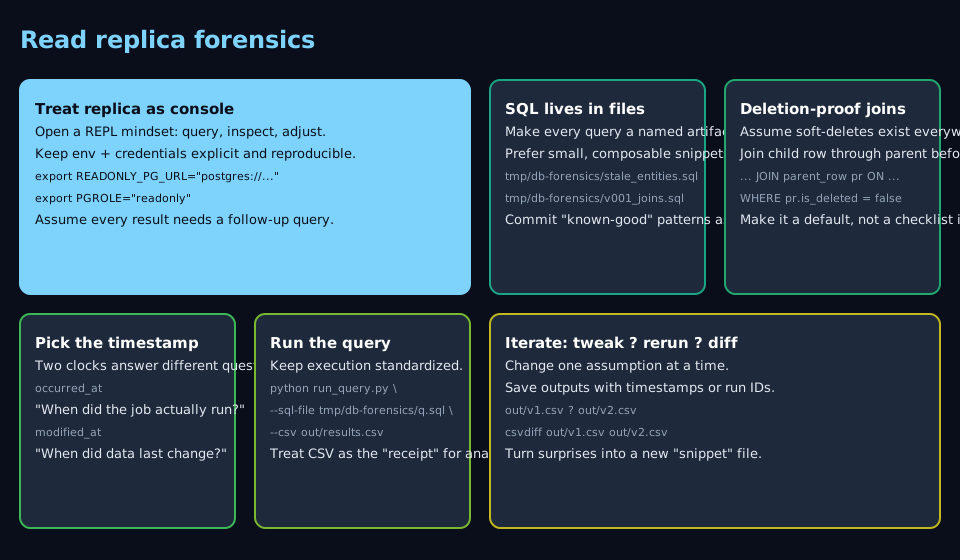
PM: which customer workflows show no event in ninety days? The app can answer, but every new definition of “workflow” means re-clicking the same filter stack. I pointed run_query.py at the read replica, wrote the join once on disk, reran when the definition shifted. CSV landed before her follow-up in Slack. I treat the replica as a forensic console: SQL on disk, logged commands, repeatable slices—faster than waiting on export buttons and accordions.
When I reach for this #
When I need truth from operational Postgres faster than export buttons and accordions allow. When I want staleness checks before a release review. When I have to show that “deleted” rows are only flagged, not gone. Any time the app’s data model is documented but the UI makes ad-hoc slices painful.
What I need before starting #
- Claude Code (or a terminal) with a read-only query helper on your
PATH(mine is a thin wrapper aroundpsycopg/asyncpg; yours might be the same pattern under a different name) - One env var the skill already knows about—e.g.
READONLY_PG_URLorAPP_DB_READ_REPLICA—exported in the session so the helper never prompts mid-tool-call - A schema note checked into the repo (
schema.md, or your skill file) listing real table names, join keys, and which columns mean “created,” “ran,” or “touched” - A scratch directory for
.sqlfiles (tmp/db-forensics/works) - Five minutes to pick the timestamp that actually answers the question (
occurred_atvsupdated_atvs job completion time)
What I do #
1. Load the skill context before the first query #
I keep a short skill doc that restates the DSN env var, the join path from detail → parent → entity, and the soft-delete columns. I ask Claude to read that file first so I’m not re-explaining keys on every turn.
2. Export the DSN once per shell #
Claude shells reset between tool calls, so I set the URL explicitly:
export READONLY_PG_URL="postgres://readonly:…@replica.example.internal:5432/app"
If I skip this, the helper blocks on credentials and the agent stalls.
3. Put real SQL on disk #
Anything past one line goes to tmp/db-forensics/stale_workflows.sql and I pass --sql-file. Piping multi-line SQL through --sql "$(cat …)" is how quoting eats half a WHERE clause. Files are boring and replayable.
4. Respect the usual grain: child → parent → thing humans name #
Most app schemas I touch:
- Child rows — events, measurements, line items
- Parent rows — the human-meaningful name or stable id
- Join path — detail → aggregate → entity, every time
On each hop I apply the soft-delete filter your app uses (is_deleted, deleted_at, etc.). Omitting one hop is how “clean” counts still include retired rows.
5. Name the timestamp you’re optimizing for #
Same English question, different SQL columns:
| Question in English | Often maps to |
|---|---|
| Last successful run | max(completed_at) on a run table |
| Last metadata touch | updated_at on a header |
They diverge after backfills or relabels. I name the column in the query and in the Slack summary so nobody mixes execution freshness with row churn.
6. Bucket entity types in-SQL when the question is selective #
When the parent has type / category / tenant tier, I filter or CASE in SQL—“integration tests only,” “paid tenants only”—instead of exporting a wide CSV and filtering in a sheet. The product UI rarely exposes the same predicate in one click.
7. Run and log the command #
python scripts/run_query.py \
  --sql-file tmp/db-forensics/stale_workflows.sql \
  --csv > tmp/db-forensics/stale_workflows.csv
I paste the exact invocation into the transcript. Lightweight probes can stay --sql 'SELECT … LIMIT 20', but anything I might re-run or defend in review lives in a file.
8. Iterate on the file, not on memory #
Follow-ups are a diff on the .sql file: another WHERE, another grouping, same join skeleton. Claude Code’s file view makes the delta obvious.
What goes wrong #
- Dropping soft-delete predicates — ghosts come back, counts inflate, you declare green when the data is haunted. Fix: bake the filter into a CTE or comment template you never delete.
- Shell quoting — use
--sql-filefor multi-line statements. - Joining detail straight to the entity — missing foreign keys, cross joins, or empty errors. Fix: follow the path you documented in the skill; don’t improvise table names.
- Guessing names — wastes a turn. Fix:
schema.mdopen, copy/paste identifiers into the prompt.
Notes #
Scratch vs promoted — keep tmp/db-forensics/ (gitignored) for throwaway SQL; promote anything reusable into analysis/ or the team SQL library.
Replica choice — read-only URL, read-only role, no migrations from this path. If the org splits “analytics replica” vs “app replica,” I point the skill at the replica that matches the question (operational truth vs warehouse truth).